Running a website means you need to know what your visitors enjoy reading. But finding those answers inside standard Google reporting tools often feels like a massive headache. You log in and just see endless, confusing rows of numbers.
MonsterInsights fixes this problem. It connects directly to your WordPress admin area and translates all those complex details into simple layouts. You can even talk to the plugin like a regular person to ask questions about your site’s performance, like finding out which articles get the most views or where your readers live.
Ready to stop guessing and start growing? Dive into this complete review to see how MonsterInsights can effortlessly skyrocket your traffic!
| Disclosure: Your support helps keep the site running! We earn a referral fee for some of the services we recommend on this page (at no extra cost to you). |
- What is MonsterInsights?
- How to Set Up MonsterInsights?
- MonsterInsights Review 2026: Top Reasons to Use MonsterInsights
- 1. Easy to use
- 2. Monitor and optimize individual posts
- 3. Discover your most selling products
- 4. Track authors, categories, and tags
- 5. Track outbound links
- 6. Find and display popular posts
- 7. Ad tracking
- 8. Detect top traffic sources
- 9. Track lead magnets
- 10. Headline analyzer
- 11. Real-time statistics
- 12. Performance metrics
- 13. Integrations
- 14. Reporting
- 15. Fast customer support
- Final thoughts
- Ready to Unlock Your Website's Potential?
- Pricing
- FAQ
What is MonsterInsights?
MonsterInsights is a great Google Analytics plugin for WordPress. Yoast SEO previously owned it under the name Google Analytics for WordPress. In 2011, Syed Balkhi, founder of WPBeginner, acquired the plugin and renamed it MonsterInsights.
Trusted by more than 3 million websites, it automatically inserts the Analytics tracking code and starts tracking visitors from the moment of activation.
This plugin collects your traffic data from Google Analytics and displays it in the WordPress dashboard. So, there is no need to visit your Analytics account each time to monitor page visits, bounce rates, and other things.
MonsterInsights can track various aspects of your site, including the countries from which you are receiving the most traffic, top referral channels, and top affiliate links, among others. If you want to find popular categories or authors on your site, it is also possible with the plugin.
eCommerce tracking is another advantage of MonsterInsights. It is helpful to track your most selling products, digital downloads, and predict your total revenue for a particular period.
These are the main features of MonsterInsights,
Pricing: $99.60/yr
Stop Guessing, Start Growing
MonsterInsights makes analytics easy. See exactly how people find and use your website, right inside your WordPress dashboard.
Get MonsterInsights NowHow to Set Up MonsterInsights?
Follow these steps to activate and set up MonsterInsights on your WordPress website.
1. Sign in to MonsterInsights and head to the Downloads tab to download the plugin. On the left side, you will see the license key. Collect it. We need it in the next step to activate the plugin.

Visit WordPress and upload MonsterInsights as a new plugin. After activation, a new screen will appear with a welcome message.

Click Launch the wizard to set up the plugin.
2. The next page will show step-by-step instructions on configuring MonsterInsights for Google Analytics.

Choose your website category first. It will automatically apply recommended settings according to your choice. Click Save and Continue to proceed.
Enter your license key to verify your purchase and enable automatic plugin updates. Click the Connect MonsterInsights button to connect to your Google Analytics account. A box will appear to sign in with your Google account and allow MonsterInsights to access your website profile.

Choose a profile to connect. Click Complete Connection to save changes.
3. Configure tracking settings as next.
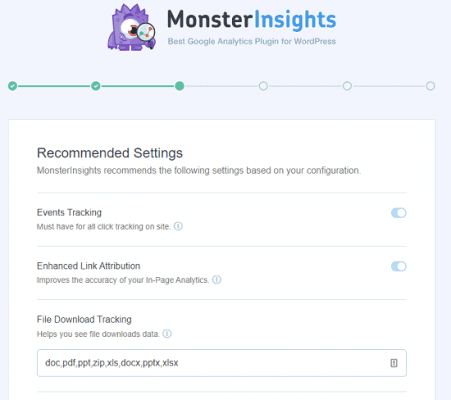
MonsterInsights automatically tracks all your external links, including affiliate links, download links, email links, and more. It will also help Google determine unique links on your site and direct search engine bots to the exact location of your pages.
By default, it tracks downloads of all popular file types, such as DOC, PDF, ZIP, etc. Add more file types if needed. Scroll down to set up affiliate link tracking and monitor the sales you referred to from the unique cloaked links.
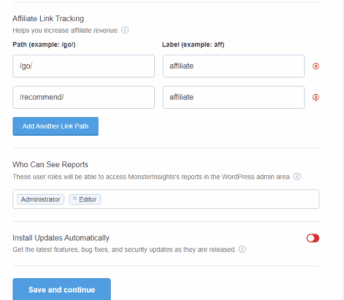
Enter your affiliate link path and assign a label to it. Click Save and Continue again.
4. Install recommended add-ons. The next screen will suggest you install various MonsterInsights addons to track individual posts, forms, ad clicks, and others. Alternatively, you can install them at a later moment through plugin settings. Save settings.
Finally, you will get a screen like this.

You’ve successfully configured MonsterInsights for Google Analytics. Exit the setup wizard to go back to the WordPress dashboard.
MonsterInsights Review 2026: Top Reasons to Use MonsterInsights
MonsterInsights is a crucial WordPress plugin that enables businesses to uncover new growth opportunities and increase revenue. Let us check the main reasons for using it on your money-making website,
1. Easy to use
Google Analytics can feel like a maze, especially if you aren’t a data scientist. That is exactly why MonsterInsights was built: to make tracking incredibly easy for beginners and pros alike.
You don’t need to touch a single line of code to get started. Just activate the plugin, follow the quick setup wizard, and you are ready to track in under five minutes. MonsterInsights pulls all your crucial data directly into your WordPress dashboard, saving you the hassle of switching between tabs.
But what makes it truly effortless now are its cutting-edge AI features. With AI Insights and AI Conversations, you can simply “chat” with your analytics or let the plugin automatically highlight key takeaways. Tracking your website’s growth has never been this simple or accessible!
2. Monitor and optimize individual posts
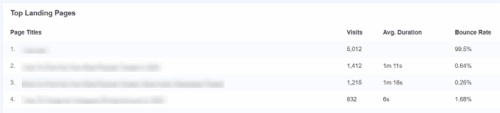
Ever wonder how your individual blog posts are actually doing? MonsterInsights lets you check your stats right inside your WordPress dashboard, making it super simple to figure out what your readers like and where they lose interest.
Instead of guessing how to improve your content, you get a few really practical features:
GDPR compliance: Keep your tracking legal and respect visitor privacy without needing to hire a developer.
Page-by-page stats: Find out which posts bring in the most traffic, how long people stay to read, and your bounce rate.
Track visitor steps: See the exact path a reader takes across your site before they finally sign up or buy something.
Smart AI insights: This feature uses artificial intelligence to automatically generate contextual takeaways and actionable insights about your website’s statistic
AI Conversations: This feature takes things to the next level by allowing you to literally “chat” with your analytics. You can ask natural questions to retrieve key stats and metrics instantly, completely eliminating the need to view or analyze complex reports.
Dashboard notes: Jot down quick reminders directly on your analytics graph. It is a great way to see if a recent SEO tweak actually boosted your traffic over time.
3. Discover your most selling products
As an e-commerce shop owner, you should know which products are selling the most and generating the most profit.
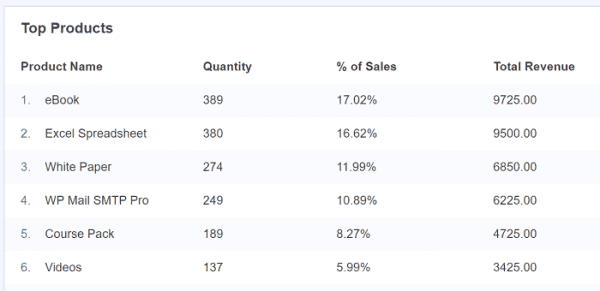
Visit Insights > Reports > eCommerce. Additionally, it will display the overall conversion rate, number of transactions, total revenue, and average order value for a selected period, providing a brief overview of the store’s performance.
Scroll down to view your top products, the number of units ordered, their percentage of the total sales, and total revenue. Sometimes, customers add products to the cart and remove them later for unknown reasons. MonsterInsights will track such user activities and display statistics on the same page.
4. Track authors, categories, and tags
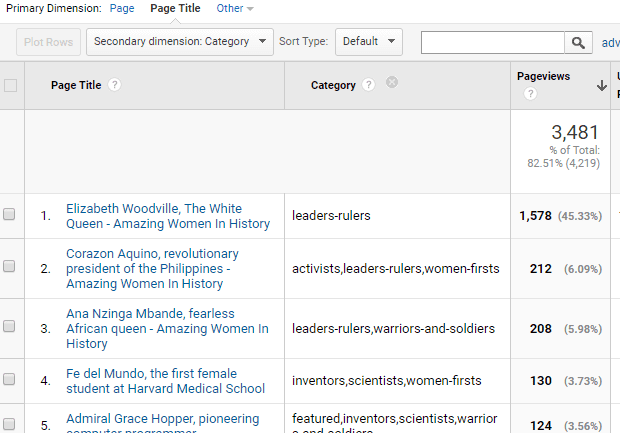
Want to know exactly what keeps your readers glued to the screen? MonsterInsights goes way beyond basic page views.
With just a few clicks, you can set up custom tracking to see which authors, categories, and tags bring in the most traffic. It automatically measures how far people scroll down your posts, so you know exactly where they lose interest. Do you embed videos? The plugin effortlessly tracks YouTube, Vimeo, and HTML5 media engagement to show what people actually watch.
You can even monitor your SEO scores and specific focus keywords to see if your hard work is paying off. All this data feeds into custom dimensions, giving you a complete picture of user engagement.
Know Your Top Performers
Instantly see your most popular posts and best-selling products. Find easily what works for you!
Find Your Winners5. Track outbound links
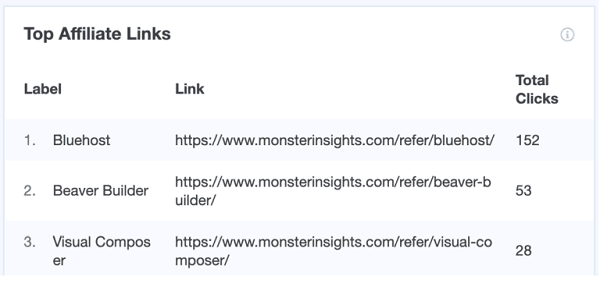
Are you leaving money on the table by not tracking exactly where your visitors click? With MonsterInsights, you don’t have to guess. This plugin automatically tracks all your outbound and affiliate links right out of the box.
If you are competing in an affiliate contest and want to see which text placements drive the most clicks, this feature is an absolute lifesaver for maximizing your commissions.
But it doesn’t stop there. MonsterInsights effortlessly monitors phone link clicks, email links, and even specific anchor links or hash URLs, letting you see exactly how readers navigate your longer guides.
Need more precision? Turn on Enhanced Link Attribution to instantly discover which specific button or text link gets the most attention, even if multiple links point to the same destination.
6. Find and display popular posts
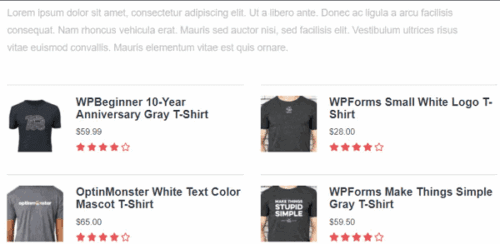
Do you want to keep visitors on your site longer and boost your sales? MonsterInsights makes it incredibly easy to find and display your most popular posts and products anywhere on your website.
Instead of manually updating your sidebar with top-performing articles, MonsterInsights handles it for you. It uses your actual traffic data from the past 30 days to automatically showcase what is currently trending.
You aren’t just limited to basic text links, either! You can choose from over 20 beautiful, customizable templates to display your best content as eye-catching inline or sidebar widgets. For e-commerce store owners, there are also dedicated templates to feature your best-selling products directly on product pages or inside the shopping cart.
It is the perfect, hands-off way to reduce your bounce rate, increase your page views, and naturally drive more revenue.
7. Ad tracking
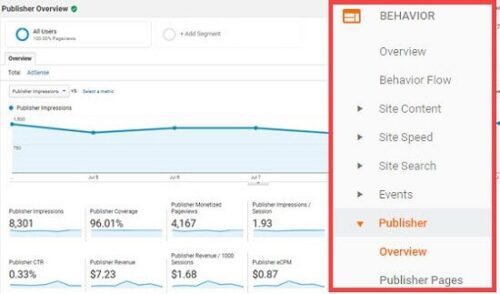
Are you running ads to grow your site but struggling to see which ones actually pay off? MonsterInsights takes the headache out of ad tracking by putting all your revenue and conversion data in one easy-to-read dashboard.
If you monetize with display ads, you can seamlessly connect your Google AdSense account to track impressions, clicks, and your total income. It even helps you spot your most profitable ad slots so you can easily maximize your daily earnings!
But it goes far beyond just AdSense. Whether you are running pay-per-click campaigns on Google and Microsoft, or launching social media ads on Meta, TikTok, Pinterest, LinkedIn, or Snapchat, MonsterInsights handles it all.
You can set up proper tracking for every platform with absolutely zero coding required, so you can see exactly which ads turn visitors into paying customers!
8. Detect top traffic sources
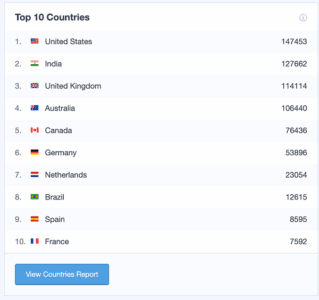
Wondering exactly where your most loyal readers are coming from? MonsterInsights makes it incredibly simple to pinpoint your top traffic sources, so you can double down on what actually works.
You will instantly see which countries, social media platforms, and referring websites send the most visitors to your blog. But the real magic happens with its powerful Search Console integration. It reveals your top Google search terms directly in your dashboard, showing exactly where you rank and how many clicks each keyword brings in. This is an absolute game-changer for mastering your SEO strategy.
Plus, with the new User Journeys feature, you can trace the exact path visitors take from that first Google search all the way to a sale or email signup. Stop guessing, uncover your most profitable traffic channels, and effortlessly scale your blog’s growth.
9. Track lead magnets
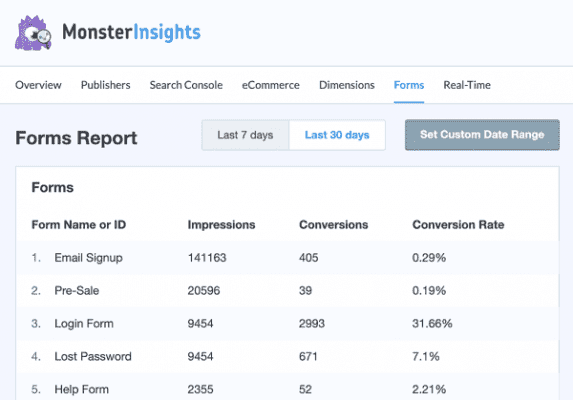
Are you tired of guessing if your lead magnets are actually working? MonsterInsights takes the mystery out of your conversions.
With automatic forms tracking, you can instantly see which contact, lead, or registration forms get the most views and the highest completion rates. It seamlessly integrates with popular plugins like WPForms, delivering the stats you need without touching a single line of code.
But that is not all! MonsterInsights also features powerful file download tracking right out of the box. If you are launching a new digital resource, like an SEO Blueprint ebook or a helpful PDF guide, you can easily track exactly how many times it gets downloaded. It automatically supports popular file extensions like PDFs, ZIPs, and DOCs.
Stop wondering if your audience is engaging with your hard work—track every download and form submission effortlessly.
10. Headline analyzer
Did you know that even the most amazing blog post can fall flat if the title doesn’t grab attention? Writing the perfect headline is an absolute must for driving traffic and nailing your SEO strategy. That’s where MonsterInsights steps in to save the day.
Instead of guessing what works, you can use the built-in smart Headline Analyzer right inside your WordPress editor. As you draft your next big article or brainstorm titles for your blog post, this powerful tool automatically scores your headlines. It evaluates word balance, character count, and emotional sentiment to ensure your titles are practically irresistible to click.
It gives you clear, actionable suggestions to improve your score before you even hit publish. Stop letting great content go unnoticed—craft catchy, high-converting headlines that boost your search rankings and make your audience want to read more!
11. Real-time statistics
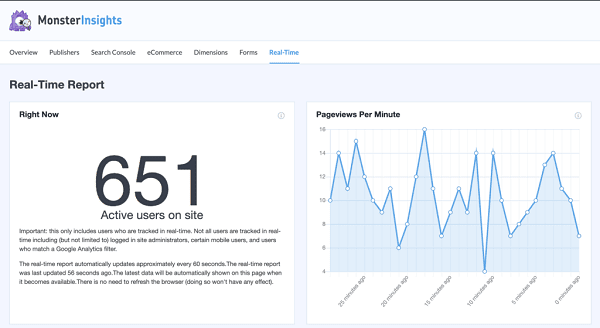
Do you want to know exactly who is on your site right this second? MonsterInsights brings your live traffic straight to your WordPress dashboard. With its real-time statistics, you can watch the active visitor count jump the exact moment you publish a new article.
You never need to navigate complex Google Analytics 4 menus again. MonsterInsights seamlessly integrates full GA4 tracking into a clean, simple Analytics Dashboard.
Need to review past performance? The Date Range History lets you effortlessly compare your traffic over any specific period to see what strategies actually work best.
Plus, you don’t even have to log in to stay updated. MonsterInsights delivers beautiful Email Summaries straight to your inbox every single week, packed with critical stats and helpful tips to keep growing.
12. Performance metrics
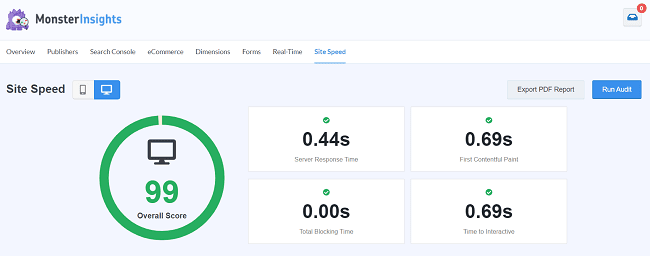
Did you know that a slow website can quietly destroy your search rankings and drive visitors away? A fast-loading site is the absolute foundation of any solid SEO blueprint.
Instead of forcing you to use confusing third-party testing tools, MonsterInsights runs a comprehensive Site Speed Report right inside your WordPress dashboard. It automatically audits your website’s performance and breaks down crucial metrics—like your server response time, total blocking time, and first contentful paint—into simple, easy-to-understand grades.
But it doesn’t just point out the problems; it actually hands you the solutions. You will get clear, actionable suggestions and recommended target times for each metric. You can quickly fix slow-loading pages, keep your readers happy, and watch your organic rankings climb.
13. Integrations
MonsterInsights is integrated with popular tools and WordPress plugins you use to extend functionalities. It includes WooCommerce, Easy Digital Downloads, MemberPress, ThirstyAffiliates, LifterLMS, and various WordPress form plugins, among others.
Hence, you can easily track eCommerce transactions, monitor the activities of MemberPress users, and determine which files are being downloaded the most, among other things, using Google Analytics.
14. Reporting
Are you swimming in data but starving for actual insights? MonsterInsights transforms confusing analytics into beautifully clear reports right in your dashboard.
If you are a content creator, the Publishers Report is your best friend, highlighting exactly which articles—like a recent listicle—are driving the most traffic and engagement. Use the Pages Report and Landing Page Report to see how well specific pages are converting, which is absolutely perfect for tracking sales of your new ebook.
Want to know where your best audience comes from? The Campaigns Report and Source/Medium Report reveal exactly which marketing efforts actually pay off. Meanwhile, the Technology Report ensures your site loads perfectly on the specific devices and browsers your readers use most.
For online stores, the Coupons Report effortlessly tracks which promotional discounts drive the most revenue. Need to share your success with a client or team? You can generate gorgeous, client-ready PDF Exports of any report with just one click!
15. Fast customer support
MonsterInsights offers priority customer support to promptly address your queries and resolve any complaints. Ask questions, raise a feature request, and even share your interest in writing a guest post for them. Their friendly support staff will respond to your messages in a few hours.
They also have a 14-day money-back guarantee on all plans.
Final thoughts
MonsterInsights is the #1 Google Analytics plugin for WordPress. It lets you track anything, including page views, file downloads, user scrolling, videos, and many others mentioned in this post.
The plugin is developed and maintained by the same team behind WPBeginner, OptinMonster, and WPForms. They have a deep knowledge of the industry, so they will never lag behind others, and you can expect the best service from them.
MonsterInsights adds more value to your marketing efforts through powerful statistics and integrations. It helps you to detect new content creation or product development opportunities and skyrocket your earnings.
Whether you are a business owner, a content marketer, or an e-commerce merchant, MonsterInsights is a great choice for gathering accurate visitor information and boosting your organic page views.
Ready to Unlock Your Website’s Potential?
MonsterInsights gives you the data you need to grow your traffic and sales with confidence. It’s the most powerful and user-friendly analytics plugin for WordPress.
Pricing
MonsterInsights has three subscription plans- Plus, Pro, and Agency.
Plus
- $99.60/year
- 1 website
- Unlimited users
- Standard features & support
Pro
- $199.60/year
- 5 websites
- Unlimited users
- Advanced features & priority support
Agency
- $399.60/year
- 25 websites
- Unlimited users
- WordPress multisite support
- Client management
- Premium support
Click here to buy MonsterInsights and grow your business (Premium support + 14-day money-back guarantee)
What is MonsterInsights?
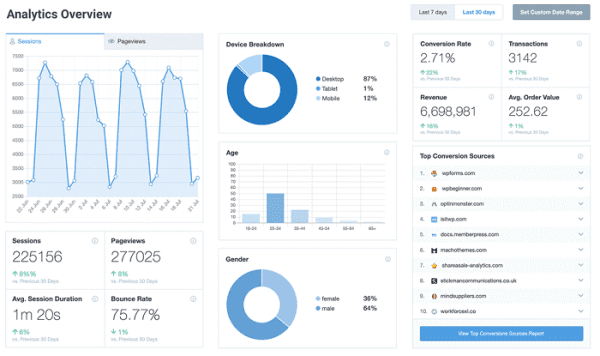
MonsterInsights is the #1 Google Analytics plugin for WordPress. It gives full data about your visitors and traffic sources directly on your website dashboard.
Find where your visitors are coming from, what marketing channels work best for you, and what type of content or product your audience likes most. Obtaining traffic and conversion data is crucial for running your business smoothly and identifying new opportunities. Therefore, we can say that MonsterInsights is an essential tool for any business.